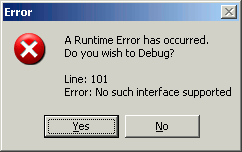
This error is produce by IE in a few situations, this small article is focused on the window.open() / appendChild() situation. When I looked online for a solution it took me half a day to understand it, I'm sure it will help someone.
You are using window.open() to get access to a window and expect to alter the DOM of this new window from the originating page. This works in all browser beside IE, which complains about an "Interface not supported". Now if you want to know why you would want to update the DOM of window opened in JS, read on, if you already identified your issue and want a solution, skip to the next part "solution".
The main reason why I open windows without an URL and alter their document with JavaScript is speed. In a framework purely in JS, loading the full framework/stack in a new window has a cost. If you wonder how to do that, look at the example at the bottom of the page, you need to write a tiny DOM and close() it before accessing it.
Internet Exploder seems to have issues using appendChild() or any DOM altering function mixing elements from different documents. Here is an example that would typically cause this error:
var win = window.open("", "stuff", "height=300,width=400,resizable=yes,location=no");
var el = document.createElement("div");
el.innerHTML = "This works!";
win.document.body.appendChild(el);
Another thing IE doesn't like is creating elements in a window without a DOM. Firefox will automatically create a body and everything it needs. The solution to this issue is to create all the elements AND EVENTS using the new window and not the original one. If you have a complex framework this means you will have to carry around the window/document on all your instances (yay!). Here is a piece of code that might help you visualize the solution:
var win = window.open("", "test2", "height=300,width=400,resizable=yes,location=no");
win.document.writeln("<html><head><title>IE Ready</title></head><body> </body></html>");
win.document.close();
setTimeout(function() {
var el = win.document.createElement("div");
el.innerHTML = "<h2>This works in IE too!</h2>";
win.document.body.appendChild(el);
}, 40);
Most JS framework already have a solution to this issue. Some will have a global variable carrying the current document all the time to avoid passing it along, some other make it implicit in their API.
According to various emails I received, it appears that some people couldn't get the this fix to work with some version of IE8. I spent the time to install the different versions and couldn't see any issue, I tested:
Last updated: 2009-03-11